BSD City, Live, Work and Play
BSD City dikenal luas sebagai pengembang properti terkemuka dan paling terdiversifikasi, mewakili desain perkotaan paling ambisius di Indonesia yang memadukan properti residensial, komersial, dan bisnis.
BSD City Sustainability Efforts
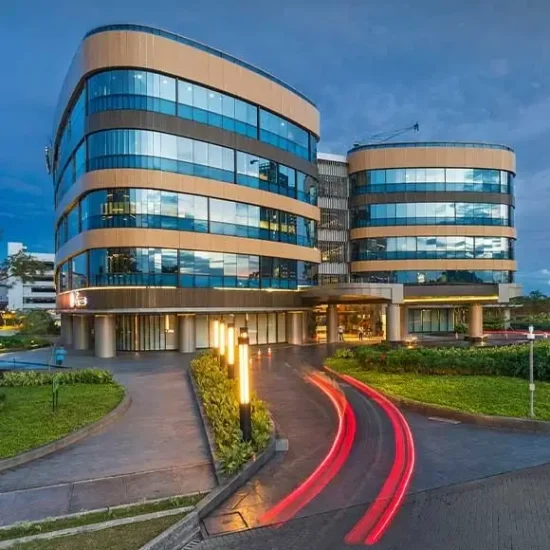

Energy Saving
Green Living Concept
Recycling Centers
Harga rumah di BSD City
Apakah Anda sedang mencari rumah di kawasan BSD City?
Hubungi Yessy marketing resmi BSD City untuk mendapatkan info lebih lanjut!
Properti di BSD City Berikut ini beberapa produk unggulan yang sedang dipasarkan, hubungi Yessy di 0816 85 8081 untuk informasi lebih lanjut.

Design
Our award-winning team of architects tackle each project with passionate and creativity.
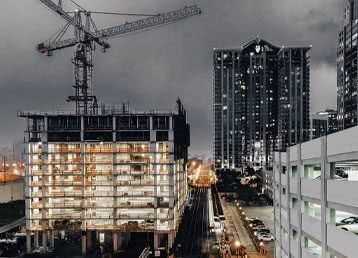
Construction
Our contractors and construction team deliver results with precision and accuracy.
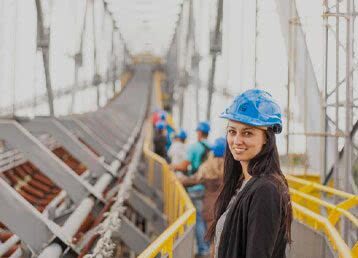
Project Management
Trust our project managers to work with you 1-on-1, each step of the way.
Latest from the Blog
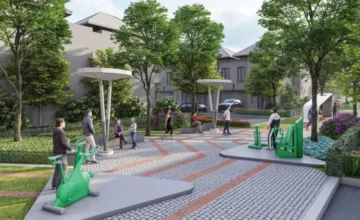
Mengulik Kecantikan Cluster Adora Terravia Hunian di BSD City
Diantara banyaknya hunian cantik, Adora Terravia menjadi hunian dengan konsep terbaik di tahun 2024. Kawasan yang berlokasi di BSD tersebut, memiliki konsep detail sutainable living serta green yang sudah dilengkapi dengan banyaknya solar panel serta vertical garden. Bahkan bukan hanya itu saja, dilengkapi dengan direct sunlight sehingga menjadikan lingkungannya cocok dihuni dengan nyaman oleh semua […]
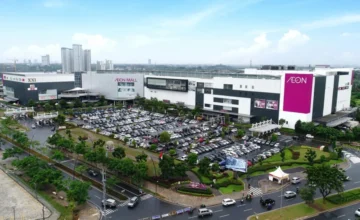
AEON Mall BSD City, Mall Keluarga Pionir Bergaya Jepang
Di Indonesia sendiri memang sudah banyak sekali Mall dengan berbagai konsepnya. Namun, AEON Mall BSD City merupakan salah satu Mall dengan konsep Jepang pertama yang ada di Indonesia. Kehadiran Mall tersebut tentunya sangat memberikan konsep juga warna baru di industri perbelanjaan saat ini. Pasalnya sudah banyak sekali Mall di Jakarta hingga mencapai 170 Mall menggunakan […]
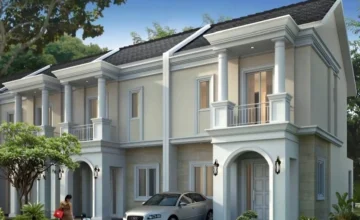
Assana Starlight Rumah Hunian Modern Dengan Nuansa Alami
BSD City mempunyai cluster perumahan mewah baru bernama Assana Starlight. Seperti halnya cluster lainnya, hunian tersebut juga mengusung rumah mewah yang modern dan sangat nyaman. Hunian tersebut sangat cocok dipilih oleh Anda yang menginginkan rumah di Jabodetabek dengan harga 1 sampai 2 Miliar. Lokasinya tentu sangat strategis dan mampu menghadirkan kenyamanan, fasilitas, dan investasi menjanjikan. […]
Hubungi Marketing Properti di BSD City
Hallo, nama saya Yessy, marketing resmi dari BSD City yang telah berpengalaman lebih dari 18 tahun di produk Sinarmas Land. Di awali dari Taman Permata Buana di Puri, Kembangan, Banjar Wijaya Tangerang, Grand Wisata Bekasi dan tentu saja Kota BSD Tangerang Serpong. Untuk informasi lebih lanjut mengenai produk dan promo jangan ragu untuk menghubungi Yessy di 0816 85 8081, dengan senang hati Yessy akan membantu.

Properti Hunian Bumi Serpong Damai
Bumi Serpong Damai dengan tag line “Big City Big Opportunity” merupakan kawasan kota mandiri yang berada di bawah naungan Sinar Mas Land. Dengan area yang dikembangkan seluas 6.000 hektar, BSD City menawarkan berbagai cluster hunian yang cocok untuk siapa pun yang sedang mencari rumah di BSD.
Live, Work & Play
BSD City juga memiliki fasilitas lengkap seperti pusat perbelanjaan, sekolah internasional, fasilitas olahraga, taman rekreasi, dan berbagai tempat hiburan yang cocok untuk dijadikan tempat tinggal bagi berbagai kalangan masyarakat. Selain itu, BSD City juga memiliki rumah-rumah yang dirancang dengan arsitektur modern dan tata kota yang teratur, membuatnya cocok keluarga yang ingin memiliki rumah atau pun individu yang menginginkan kualitas hidup yang tinggi.
Lokasi dan Akses BSD City
Salah satu keunggulan BSD City adalah kemudahan akses tol JORR dan lokasinya yang strategis, karena terletak tidak jauh dari pusat kota Jakarta. Hal ini menjadikan BSD City sebagai salah satu kota yang bisa menjadi tempat tinggal bagi pekerja yang bekerja di pusat kota Jakarta namun ingin tinggal di lingkungan yang lebih sejuk dan modern. Selain itu, BSD City juga merupakan salah satu instrumen investasi yang menjanjikan, terutama dalam bidang properti di kawasan tersebut.
Faktor yang juga turut memperkuat keunggulan BSD City adalah adanya dukungan dari emiten grup Sinarmas, salah satu perusahaan terkemuka di Indonesia termasuk Asia, yang memiliki komitmen dalam mengembangkan kawasan di BSD City sebagai kota yang modern terbesar di Indonesia, berkembang, dan menjadi pusat bisnis dan hunian yang berkualitas. Dengan dukungan ini, BSD City semakin mengukuhkan posisinya sebagai kota yang memberikan nilai tambah bagi para penghuninya, baik dari segi kualitas hunian maupun nilai investasi properti.
Properti di BSD City
Beberapa proyek sukses telah diselesaikan di BSD, antara lain The Zora, Vanya Park, The Mozia, Foresta, De Latinos, The Icon, Breezy House, dan Upper West BSD. Tidak hanya itu, BSD City juga memiliki fasilitas bisnis dan hiburan yang tersedia, seperti ITC BSD, BSD Junction, BSD Plaza, ICE BSD, dan Ocean Park Water Adventure yang luasnya mencapai 8,5 hektar.
Kota BSD is not just a housing estate, it is an opportunity for anyone who wants to stay in a city with the most ambitious urban planning scheme in Indonesia to combine housing, business and commercial properties. The people can enjoy various facilities such as schools, playgrounds, and also enjoy shopping at AEON Mall, ITC BSD, and BSD Junction.
Located near the greater Jakarta area, the city is a rapidly developing region that is yet to be fully discovered by the world. It offers a unique blend of technology, green living, and vibrant environment. With a vision to become the next smart city, it provides a plethora of opportunities for businesses and individuals alike.
Not only that, BSD City also provides the residents with access to school, healthcare and a vibrant business district, making it a well-rounded community for all residents. One of the key attractions of this township is the strategic location, with easy access by public transportation such as TransJakarta or shuttle bus BSD Link to the Jakarta city center and Soekarno-Hatta International Airport.
This makes BSD City an ideal place for both residential and commercial purposes. Additionally, this township is also home to the prestigious Sinarmas World Academy, offering top-quality education for the children. With the modern infrastructures and well-planned urban environment, BSD is an ideal place for families, professionals, and anyone looking for a high-quality living experience.
In conclusion, BSD City, as a subsidiary of Sinar Mas Group, offers a wide range of housing options, from affordable homes to luxurious mansions. Whether you are looking to own a property or make an investment, the development of BSD City provides ample opportunities for anyone interested in joining its vibrant and growing community. With its prime location in the region, comprehensive facilities, and well-designed city planning scheme, BSD City is truly a remarkable and attractive place to stay and invest in.